
The short answer: which version should you choose?
Choose OmniHuman 2.0 when your main requirement is a longer audio-driven performance in a hosted workflow. It supports 720p output and up to five minutes per generation, which can reduce the need to split a song, presentation or narration into many separate clips.
If you already use OmniHuman 1.5 successfully for short shots, compare the new version against those same inputs before changing your workflow. A larger duration allowance does not guarantee a better face, gesture or expression in every scene.
This comparison covers capabilities and practical workflows; we have not run a controlled, same-input benchmark of both versions.
OmniHuman 2.0 vs 1.5 at a glance
| Dimension | OmniHuman 2.0 | OmniHuman 1.5 |
|---|---|---|
| Core workflow | One image, audio and an optional prompt. | One image and audio, with optional text direction in the research model. |
| Hosted duration comparison | Up to 300 seconds per generation. | Up to 30 seconds in the prior hosted workflow. |
| Research duration | Up to five minutes in the hosted workflow. | Research demonstrations exceed one minute. |
| Output resolution | 720p in our Studio. | Hosted output resolution depends on the service. |
| Motion and camera direction | Prompts can direct actions, camera moves and background events. | Research demonstrations include text-guided actions and camera movement. |
| Group scenes | Supports selecting a speaker and natural reactions from others. | Research demonstrations include routing separate audio tracks to different characters. |
| Access on this website | Available in our image + audio + prompt Studio. | No OmniHuman 1.5 model selector is offered here. |
Round 1: expression, motion and audio understanding
Both versions go beyond moving the mouth. OmniHuman 1.5 demonstrates performances shaped by spoken meaning, emotion and musical phrasing. OmniHuman 2.0 likewise supports gestures and reactions that relate to the audio, including examples generated without a text prompt.
The product documentation describes improvements in motion expressiveness and visual quality over 1.5. Treat this as the provider’s improvement claim, rather than a measured win for every scene. Different source images, recordings and shot lengths can change the result considerably.
What to look for in your own comparison
- Do expressions change with the line rather than repeating throughout the shot?
- Do hands and shoulders support the meaning of the speech?
- Does the face remain recognizable during turns and gestures?
- Are pauses and quieter moments handled naturally?
Practical verdict: 2.0 is worth testing for a performance-heavy brief, but the published material alone does not establish a universal quality winner. Keep the image, audio and shot direction the same when judging a switch.
Singing and expression
Watch how mouth shapes, breathing, facial expression and body movement follow the music.
OmniHuman 1.5 Research demo
OmniHuman 2.0
Independent examples with different images, audio and direction. These illustrate each version’s capabilities, not a controlled quality comparison.
Speech and emotion
Watch the timing of gestures, changes in gaze and facial expression during speech.
OmniHuman 1.5 Research demo
OmniHuman 2.0
Independent examples with different images, audio and direction. These illustrate each version’s capabilities, not a controlled quality comparison.
Round 2: prompt following and camera control
Text prompting is not unique to 2.0. OmniHuman 1.5’s research examples already include directed actions, camera paths and changes to a scene. The useful question is how clearly your chosen service exposes those controls and how reliably they work with your shot.
A practical writing structure is to describe the camera, the speaker’s emotion, the speaking or singing state, the action and any background event. You can also specify action order, gestures before or after speech, visual effects and focus shifts between characters.
This original example gives you a simple test brief. Start with a short sequence before adding an orbit, a dramatic reaction and a background effect to the same shot.
Practical verdict: choose 2.0 here for an available prompt-driven workflow, not because 1.5 lacked text direction. Our OmniHuman prompt guide includes seven techniques with matching inputs and outputs.
Camera movement and continuous action
Watch facial consistency during movement, coordination between the body and voice, and how the camera follows the character.
OmniHuman 1.5 Research demo
OmniHuman 2.0
Independent examples with different images, audio and direction. These illustrate each version’s capabilities, not a controlled quality comparison.
Round 3: group scenes and creative characters
Both versions support more than a single realistic human portrait, including group interactions and stylized subjects. In 2.0, you can specify a speaker in a group image and animate animals, cartoons and pixel-style characters.
Input controls matter as much as the demonstration. The 1.5 research model supports separate audio tracks assigned to different characters. Our 2.0 Studio accepts one image and one audio track, with an optional prompt. It does not offer a separate track-assignment control for every person.
For a group image, identify the speaker clearly and give listeners restrained reactions. Start with one main speaking role so the instruction and supplied audio support each other.
Practical verdict: both versions have documented multi-character capabilities. For a production requiring independent dialogue tracks, verify that the specific interface supports that workflow before selecting it.
Group scenes and listener reactions
Watch which character speaks, how the listeners react, and whether faces remain consistent as attention shifts within the group.
OmniHuman 1.5 Research demo
OmniHuman 2.0
Independent examples with different images, audio and direction. These illustrate each version’s capabilities, not a controlled quality comparison.
Creative characters and animal interaction
Watch how speech translates into an animal character’s mouth movements, expressions and paw gestures while preserving its appearance.
OmniHuman 1.5 Research demo
OmniHuman 2.0
Independent examples with different images, audio and direction. These illustrate each version’s capabilities, not a controlled quality comparison.
Round 4: cost and the workflow you actually use
The documented API list price is $0.07 per second for 2.0, compared with $0.12 per second for 1.5. These provider figures are dated October 21, 2026 and are separate from the credit packages on this website.
On OmniHumanAI, the Studio estimates 2 credits per second, with duration rounded up and checked by the server. A 10-second input estimates 20 credits; a 30-second input estimates 60 credits. Check our pricing page for the current plans.
A longer allowance also means a longer generation can cost more in total. Use Audio cut to prepare a short test and confirm the performance before submitting the entire recording.
Practical verdict: compare the total cost of the usable result, including retries and editing. Do not mix a provider’s per-second list price with a platform’s credit balance when calculating a budget.
Which model fits your project?
Choose OmniHuman 2.0 when…
- Your recording needs more than the prior hosted version’s 30-second allowance.
- You want to make a song performance, lesson or presentation with fewer stitched segments.
- You want the image, audio and optional prompt workflow available on this website.
- You are ready to test the provider’s claimed improvements against your own reference material.
Keep evaluating OmniHuman 1.5 when…
- Your existing short-shot workflow already produces the performance you need.
- You are studying the 1.5 research system and its published demonstrations.
- Your current service exposes a specific multi-track or other control you still need to verify elsewhere.
Our conclusion: the strongest reason to choose 2.0 is the documented expansion of the hosted workflow to five minutes. Prompting, emotional animation and group scenes already appear in 1.5 research, so the version number alone is not a reason to discard a successful short-shot workflow.
Try OmniHuman 2.0 on our platform
Open the Studio, upload a reference image and your audio, then add an optional prompt. Review the estimated credits before generating. You can load the existing template to inspect how the image, recording and direction fit together.
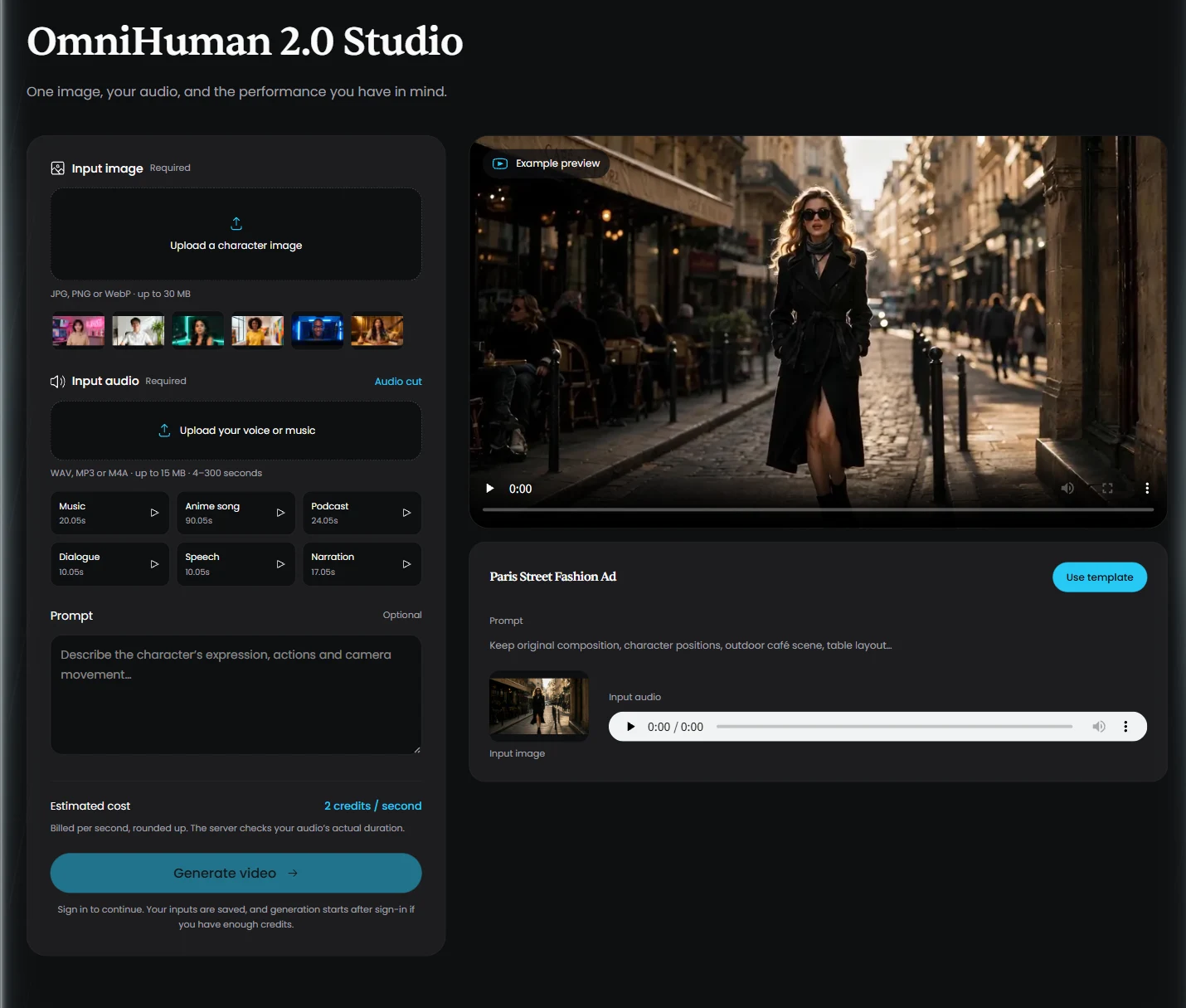
Our platform currently offers OmniHuman 2.0. To compare it with 1.5, you will need access to a separate 1.5 workflow. Use the same short audio clip and image, record the settings and compare the whole performance rather than a single frame.
Open the Studio or read the prompt-writing guide before your first test.
Frequently asked questions
What is the biggest difference between OmniHuman 2.0 and 1.5?
OmniHuman 2.0 supports a hosted generation limit of 300 seconds, compared with 30 seconds for the prior version. The product documentation also reports better consistency, expressiveness and visual quality. The 1.5 research model separately demonstrated videos longer than a minute.
Does OmniHuman 1.5 support text prompts?
Yes. OmniHuman 1.5 research demonstrations include text-guided animation, including actions and camera movement. Prompting should not be described as exclusive to 2.0.
Is OmniHuman 2.0 always better at lip sync?
A newer version does not guarantee better results on every input. Evaluate the same image and audio for mouth timing, facial consistency and expression. This article does not report a controlled head-to-head benchmark.
Does OmniHuman 2.0 generate the voice from my prompt?
The workflow described here uses an audio track you supply. Your prompt directs the performance and scene; it is not a replacement for the required voice or music input.
Can I use both models on this website?
This website currently offers OmniHuman 2.0. It does not offer a 1.5 model selector or a built-in comparison mode.
Can I generate a five-minute video in one run?
OmniHuman 2.0 supports up to 300 seconds, and our Studio accepts audio lasting 4–300 seconds. Review longer results carefully because the maximum allowed duration does not guarantee consistent quality throughout.
Give your next performance a clear direction.
Start with one image and your audio. Add a focused prompt, then review the result.
Open OmniHuman 2.0 Studio